
The rapid mainstream adoption of autonomous coding agents—from background workers powered by Claude 3.7 Sonnet and OpenAI reasoning models to developer tools like Devin, Cursor, and enterprise Model Context Protocol (MCP) gateways—has fundamentally upended software security paradigms. For decades, software security models operated under an implicit assumption: application code running in staging or production environments was written by human engineers, vetted by static analysis linters, and scrutinized through peer pull requests before deployment. Even in continuous delivery setups, the code paths executing on cloud compute had predictable, bounded behaviors.
Autonomous AI agents completely dismantle this premise. In an agentic execution loop, an LLM dynamically plans terminal actions, writes unverified scripts in Python, Bash, or Node.js, and immediately submits them to a shell interpreter for evaluation. Crucially, these agents ingest untrusted inputs from across the web—scraping external API endpoints, reading third-party GitHub repositories, parsing untrusted PDF invoices, or querying public search engines. When malicious actors embed indirect prompt injections into these untrusted data sources, the AI model can be coerced into generating hostile payloads designed to exfiltrate private credentials, establish reverse TCP shells, or trigger local privilege escalations.
At Beyond Ambition, our AI Engineering & LLM Integration Practice and DevOps & Cloud Infrastructure Consulting Teams design resilient platforms for high-throughput client applications. From safeguarding proprietary financial risk systems like Atmos Funded to building autonomous enterprise agents for IonicX AI, enforcing absolute isolation between untrusted AI workloads and host operating systems is a non-negotiable security requirement. In this architectural teardown, we analyze why standard Docker containers provide a dangerously porous boundary for AI execution, dissect the internal mechanics of Google's **gVisor** user-space kernel versus AWS's **Firecracker** hardware-virtualized microVMs, evaluate benchmark trade-offs, and implement hardened production sandboxes with strict eBPF network controls.
1. The Shared Kernel Hazard: Why Standard Docker Fails Under Agentic AI
Many development teams building their first AI agent prototypes reach for standard Docker containers as their default isolation mechanism. The reasoning seems plausible at first glance: Docker provides lightweight containerization, packages dependencies cleanly, launches in tens of milliseconds, and supports Linux resource constraints (`cgroups`) and namespaces (`pid`, `net`, `ipc`, `mnt`, `uts`). Developers spin up a base `python:3.12-slim` container, mount a working workspace, and pipe agent-generated code into `subprocess.run()`.
In an adversarial agentic environment, this architecture represents a critical operational vulnerability. Docker containers do not virtualize hardware; they are merely isolated Linux processes executing directly on top of the host operating system's shared kernel. A standard Linux container running via `runc` exposes more than 350 system calls directly to the guest process. If an untrusted agent executes a script that exploits a kernel vulnerability, memory corruption flaw, or file-descriptor leak, the attacker breaches container isolation and gains unrestricted root access to the physical host node.
- **Host Kernel Exploits:** A container sharing `/lib/modules` or accessing vulnerable kernel subsystems (such as `io_uring`, netfilter, or eBPF verifier flaws) can trigger privilege escalations that compromise all neighboring tenant containers on the same host.
- **runc and Container Engine Breakouts:** Real-world vulnerabilities such as CVE-2024-21626 (runc Leaked File Descriptor Container Breakout) proved that untrusted code can exploit internal working directory descriptors to escape container boundaries and overwrite host binaries like `/bin/sh`.
- **Resource Exhaustion and Kernel Panics:** Unlike human code that fails gracefully, hallucinated or prompt-injected LLM loops frequently generate fork bombs, runaway multi-threaded memory allocations, or invalid socket operations that exhaust host kernel file descriptors, bringing down the entire worker node.
- **Credential & Metadata Service Harvesting:** In cloud environments (AWS EC2, Google Cloud Compute Engine, Azure VMs), an unisolated container with access to default network interfaces can probe the link-local Instance Metadata Service (IMDSv2 at `169.254.169.254`) to steal temporary IAM role credentials.
2. Google gVisor: Intercepting System Calls with a User-Space Sentry
To bridge the gap between lightweight container ergonomics and robust kernel isolation, Google engineered **gVisor** (licensed under Apache 2.0). Originally developed to protect internal multi-tenant services and later powering Google Cloud Run and Google App Engine, gVisor introduces an intermediate application kernel running entirely in user-space called the **Sentry**.
Instead of allowing containerized applications to invoke system calls directly against the host Linux kernel, gVisor ships an OCI-compliant runtime called `runsc` (Run Sentry Container). When Docker or Kubernetes initiates a container backed by `runsc`, all system calls emitted by the agent process are intercepted and handled by the Sentry. The Sentry is written in memory-safe Go, reimplementing core Linux kernel primitives—such as file systems, thread management, memory paging, and network sockets—without executing C-based host kernel routines.
gVisor's architecture is composed of two distinct components that enforce defense-in-depth:
- **The Sentry (Userspace Kernel):** Implements the Linux Application Binary Interface (ABI). When an AI agent script executes `open()`, `fork()`, or `socket()`, the Sentry validates and services the call in userspace. It drastically reduces the host attack surface: of the ~350 Linux system calls, the Sentry exposes fewer than 70 heavily restricted calls to the host kernel via `ptrace` or KVM virtualization hooks.
- **The Gofer (File Proxy):** To prevent untrusted processes from exploiting host filesystem drivers, file operations are delegated to an isolated companion process called the Gofer. The Sentry communicates with the Gofer over a UNIX domain socket using the 9P or LISAFS protocol. Even if an agent script manipulates symlinks or attempts directory traversal, the Gofer restricts reads and writes strictly to the mounted sandbox directory.
3. AWS Firecracker: Hardware-Virtualizing Ephemeral MicroVMs
While gVisor emulates Linux kernel behaviors in software, Amazon Web Services took a fundamentally different approach with **Firecracker**. Open-sourced in 2018 and powering AWS Lambda and AWS Fargate, Firecracker is a minimalist Virtual Machine Monitor (VMM) written in memory-safe Rust that leverages Linux's native Kernel-based Virtual Machine (KVM).
Traditional hypervisors like QEMU were designed for legacy enterprise virtualization. They emulate hundreds of legacy PC devices—IDE controllers, floppy disks, ACPI tables, and PCI buses—resulting in a massive Trusted Computing Base (TCB) exceeding 1.4 million lines of complex C code. Firecracker stripped away all legacy device emulation, retaining only the absolute bare minimum required to boot modern Linux: a serial console, a minimalist block device (virtio-block), a network interface (virtio-net), a balloon memory driver, and a hardware RNG (virtio-rng).
Because of this radical reduction in complexity, Firecracker's TCB is approximately 50,000 lines of audited Rust code. Each microVM launches with its own dedicated guest Linux kernel and minimal root filesystem (`rootfs`). From the host perspective, an exploit inside the microVM would have to achieve the near-impossible: break out of the guest kernel, break out of the KVM hypervisor hardware virtualization boundary, and exploit a memory-safe Rust binary without triggering a panic.
- **Sub-150ms Cold Starts:** By eliminating PCI device discovery and BIOS initialization, Firecracker can boot an ephemeral microVM from disk in approximately 125 milliseconds.
- **Minimal Memory Overhead:** A base Firecracker microVM requires less than 5MB of host memory overhead per instance, enabling cloud providers and platform operators to co-locate thousands of isolated microVMs on a single bare-metal server.
- **True Kernel Autonomy:** Because each microVM boots its own dedicated kernel, an AI agent script that triggers a kernel panic or corrupts memory crashes only its isolated sandbox, leaving the host operating system completely unaffected.
4. Head-to-Head Comparison: gVisor vs. Firecracker Architectural Trade-Offs
Selecting the optimal sandboxing runtime for autonomous AI code execution depends on your infrastructure constraints, performance requirements, and threat tolerance. The following engineering comparison matrix breaks down the technical differences between standard Docker (`runc`), Google gVisor (`runsc`), and AWS Firecracker microVMs:
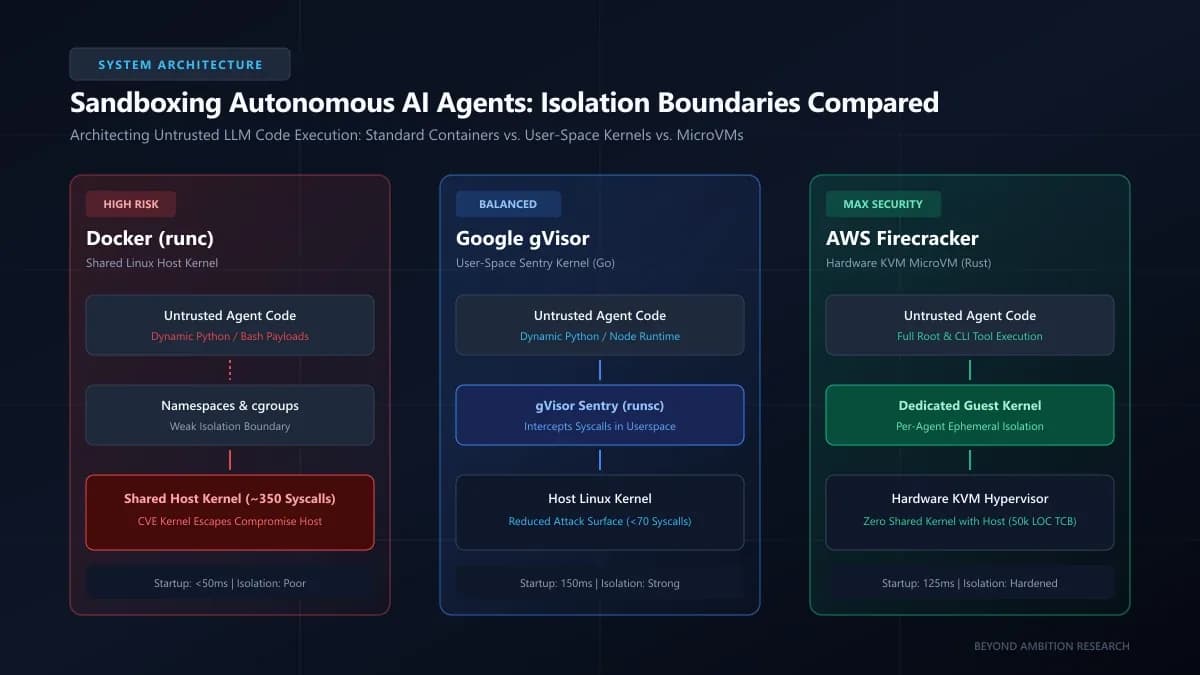
| Architectural Dimension | Standard Docker (runc) | Google gVisor (runsc) | AWS Firecracker (MicroVM) |
|---|---|---|---|
| Isolation Boundary | Kernel namespaces & cgroups | Go user-space kernel (Sentry) | Hardware KVM virtualization + Guest Kernel |
| Host Kernel Exposure | Direct access to ~350 host syscalls | Filtered to <70 restricted host syscalls | Zero shared kernel (Hardware KVM isolation) |
| Trusted Computing Base (TCB) | Entire host Linux kernel (30M+ LOC) | ~250k LOC (Memory-safe Go) | ~50k LOC (Memory-safe Rust) |
| Startup Cold-Boot Latency | <50 ms | ~120 - 200 ms | ~100 - 150 ms |
| Host Memory Overhead | ~1 - 2 MB per container | ~15 - 30 MB per sandbox | ~5 MB per microVM |
| Syscall & I/O Overhead | Near-zero overhead | Moderate (user-to-host intercept cost) | Near-native (hardware VT-x / AMD-V) |
| Docker / K8s Ecosystem Fit | Native default runtime | Drop-in OCI runtime (`runtimeHandler`) | Requires Kata Containers or custom API daemon |
| Host Hardware Requirements | Any Linux kernel | Any Linux kernel (KVM/ptrace) | Bare-metal KVM or nested virtualization |
Shipping Next.js 16, Multi-Agent RAG, or High-Concurrency Microservices?
Partner with Beyond Ambition Limited (NZBN 9429053304834) for fixed-milestone delivery and 99.99% SLA guarantees.
5. Configuring gVisor with Docker and Kubernetes: A Production Blueprint
For engineering teams operating existing Docker or Kubernetes infrastructure, **gVisor** represents the fastest path to production sandboxing because it integrates seamlessly as an OCI runtime without requiring bare-metal hypervisor orchestration. To deploy gVisor on an Ubuntu/Debian production node, install the `runsc` binary and register it inside `/etc/docker/daemon.json`:
// /etc/docker/daemon.json - Hardening Docker with Google gVisor (runsc)
{
  "runtimes": {
    "runsc": {
      "path": "/usr/local/bin/runsc",
      "runtimeArgs": [
        "--platform=kvm",
        "--network=sandbox",
        "--file-access=shared"
      ]
    }
  },
  "default-runtime": "runc"
}
Once the Docker daemon is reloaded with `systemctl restart docker`, executing an AI agent's untrusted Python script inside a gVisor-hardened sandbox requires only the `--runtime=runsc` flag. In addition to the runtime, you should enforce strict resource limits, drop all Linux capabilities, and mount a temporary in-memory read-only filesystem:
# Production execution command for an untrusted AI agent script
docker run --rm \
  --runtime=runsc \
  --cap-drop=ALL \
  --security-opt=no-new-privileges:true \
  --memory=512m \
  --cpus=1.0 \
  --pids-limit=64 \
  --read-only \
  --tmpfs /tmp:rw,noexec,nosuid,size=64m \
  --network none \
  python:3.12-alpine \
  python -c "import os; print('Executing safely under gVisor Sentry'); print('UID:', os.getuid())"
In Kubernetes clusters managed by our DevOps & Cloud Systems Practice, gVisor is configured using a native `RuntimeClass`. This allows your agent orchestrator to schedule untrusted worker pods to gVisor while keeping high-performance backend databases on standard `runc`:
# kubernetes-gvisor-runtime.yaml
apiVersion: node.k8s.io/v1
kind: RuntimeClass
metadata:
  name: gvisor
handler: runsc
---
apiVersion: v1
kind: Pod
metadata:
  name: ai-agent-sandbox-worker
  labels:
    role: agent-executor
spec:
  runtimeClassName: gvisor
  containers:
  - name: code-runner
    image: ghcr.io/beyond-ambition/python-agent-runner:latest
    resources:
      limits:
        cpu: "1000m"
        memory: "512Mi"
      requests:
        cpu: "250m"
        memory: "128Mi"
    securityContext:
      allowPrivilegeEscalation: false
      readOnlyRootFilesystem: true
      capabilities:
        drop:
        - ALL
6. Building Firecracker MicroVM Sandboxes for Dynamic Agent Runtimes
When building consumer-facing AI agent platforms—such as automated code execution sandboxes, AI software engineers that run arbitrary terminal shell commands, or multi-step browser automation agents—even the theoretical attack surface of gVisor's Go userspace kernel may be unacceptable. In high-assurance environments, **AWS Firecracker** delivers absolute isolation.
Firecracker exposes an in-memory REST API listening on a local UNIX domain socket (e.g., `/tmp/firecracker.socket`). An orchestration daemon boots an uncompressed guest kernel (`vmlinux`) and attaches an ext4 root filesystem containing the target language runtime. Here is a production Python controller demonstrating how an agent backend spins up an ephemeral Firecracker microVM:
import os
import requests_unixsocket
import subprocess
import time

class FirecrackerSandbox:
    def __init__(self, vm_id: str, socket_path: str = "/tmp/firecracker.socket"):
        self.vm_id = vm_id
        self.socket_path = socket_path
        self.encoded_socket = socket_path.replace("/", "%2F")
        self.base_url = f"http+unix://{self.encoded_socket}"
        self.session = requests_unixsocket.Session()

    def boot_sandbox(self, kernel_path: str, rootfs_path: str, memory_mb: int = 512, vcpu_count: int = 2):
        # 1. Clean previous socket and spawn Firecracker process
        if os.path.exists(self.socket_path):
            os.remove(self.socket_path)

        self.process = subprocess.Popen([
            "firecracker",
            "--api-sock", self.socket_path
        ], stdout=subprocess.DEVNULL, stderr=subprocess.DEVNULL)

        # Await socket initialization
        time.sleep(0.05)

        # 2. Configure Machine Specs (vCPUs and RAM)
        self.session.put(f"{self.base_url}/machine-config", json={
            "vcpu_count": vcpu_count,
            "mem_size_mib": memory_mb,
            "smt": False
        })

        # 3. Configure Boot Source (Guest Linux Kernel)
        self.session.put(f"{self.base_url}/boot-source", json={
            "kernel_image_path": kernel_path,
            "boot_args": "console=ttyS0 reboot=k panic=1 pci=off init=/init quiet"
        })

        # 4. Attach Ephemeral Root Filesystem (ext4 rootfs)
        self.session.put(f"{self.base_url}/drives/rootfs", json={
            "drive_id": "rootfs",
            "path_on_host": rootfs_path,
            "is_root_device": True,
            "is_read_only": False
        })

        # 5. Issue InstanceStart Command
        resp = self.session.put(f"{self.base_url}/actions", json={
            "action_type": "InstanceStart"
        })

        if resp.status_code == 204:
            print(f"[+] MicroVM {self.vm_id} successfully booted in <130ms")
            return True
        raise RuntimeError(f"Firecracker boot failed: {resp.text}")

    def teardown(self):
        if hasattr(self, 'process'):
            self.process.terminate()
            self.process.wait()
        if os.path.exists(self.socket_path):
            os.remove(self.socket_path)
7. Network Egress Hardening: Blocking Exfiltration via eBPF and Cilium
Kernel isolation solves only half of the sandboxing equation. The primary objective of most indirect prompt-injection exploits is **data exfiltration**. If an untrusted agent executes code that accesses internal cloud metadata endpoints (`169.254.169.254`), queries private VPC database clusters, or initiates outbound DNS tunneling to a command-and-control (C2) server, the attack succeeds even if the sandbox remains unbreached.
To neutralize network-layer exfiltration, our Zero-Trust Cybersecurity Practice implements strict default-deny egress policies. In Kubernetes environments, this is enforced using **Cilium eBPF network policies**, which filter traffic directly inside the Linux socket buffer without incurring the latency penalties of traditional iptables:
# cilium-agent-egress-lockdown.yaml
apiVersion: "cilium.io/v2"
kind: CiliumNetworkPolicy
metadata:
  name: sandbox-agent-egress-quarantine
  namespace: agent-sandboxes
spec:
  endpointSelector:
    matchLabels:
      role: agent-executor
  egress:
  # 1. Strictly block link-local cloud metadata (AWS/GCP/Azure)
  - toCIDRSet:
    - cidr: 0.0.0.0/0
      exceptCIDRs:
      - 169.254.169.254/32
      - 10.0.0.0/8
      - 172.16.0.0/12
      - 192.168.0.0/16
    toPorts:
    - ports:
      - port: "443"
        protocol: TCP
  # 2. Allow DNS resolution ONLY to trusted in-cluster CoreDNS
  - toEndpoints:
    - matchLabels:
        k8s-app: kube-dns
    toPorts:
    - ports:
      - port: "53"
        protocol: UDP
      rules:
        dns:
        - matchPattern: "*.pypi.org"
        - matchPattern: "*.pythonhosted.org"
        - matchPattern: "*.npmjs.org"
8. Enterprise Case Study: Hardening a Multi-Tenant AI Coding Platform
Multi-Tenant Agent Fleet: Quarantining 10,000 Dynamic AI Executions Daily
A fast-growing developer tooling startup provided autonomous coding agents that generated and tested full-stack pull requests. Their legacy infrastructure utilized standard Docker containers on shared Kubernetes worker nodes. During a scheduled red-team security assessment, ethical hackers demonstrated that a prompt-injected repository comment could execute a malicious C payload, trigger a runc container breakout (similar to CVE-2024-21626), access the node's Docker daemon socket, and read environment secrets belonging to 14 other enterprise customers.
Beyond Ambition's AI Engineering and Cybersecurity Teams restructured the entire execution tier. We transitioned all dynamic code execution pods to Google gVisor (runsc) with strict read-only root filesystems and capability dropping. High-risk terminal execution tasks were routed to dedicated bare-metal nodes orchestrating ephemeral AWS Firecracker microVMs with sub-150ms boot times. We coupled this compute boundary with Cilium eBPF egress filtering that blocked cloud metadata endpoints and unauthorized DNS tunneling.
Architectural Takeaway: True defense-in-depth for autonomous AI workloads requires decoupling application logic from system execution. By combining user-space syscall interception (gVisor) or hardware microVMs (Firecracker) with strict eBPF network quarantine, enterprise platforms can run untrusted LLM-generated code at scale without risking infrastructure compromise.
9. Architectural Decision Guide: Which Sandbox Runtime Should You Choose?
When deciding between Google gVisor and AWS Firecracker for your company's AI applications, evaluate your team's operational readiness and the nature of the untrusted code being executed:
- **Choose Google gVisor if:** You already run standard Docker or Kubernetes clusters (EKS, GKE, AKS); your agents execute structured data analysis or language runtimes (Python, Node.js, Ruby); you require rapid deployment without managing bare-metal virtualization hardware; and you need standard OCI container image compatibility.
- **Choose AWS Firecracker if:** Your agents run arbitrary, low-level shell commands, compile custom C/C++ libraries, or inspect raw system devices; you require absolute hardware-virtualized kernel boundaries; you operate bare-metal cloud compute (such as AWS i3en or c5.metal instances); and you are prepared to manage custom rootfs images and socket orchestration.
- **Avoid Standard Docker if:** Any portion of the code being executed was generated dynamically by an LLM parsing untrusted inputs, or if multiple tenants share the same physical or virtual host.
Are you planning an autonomous AI agent workflow or modernizing your multi-tenant cloud architecture? Beyond Ambition Limited partners with high-growth technology companies across Australia, New Zealand, the United States, and worldwide to architect resilient, zero-trust infrastructure. Book a Technical Consultation with our solutions architects or contact our engineering team to discuss your application security requirements.