
For more than a decade, frontend engineering teams building rich, animated user interfaces in React operated under an uncomfortable architectural compromise. Delivering fluid layout transitions, shared-element card morphs, and route change animations required shipping hefty client-side JavaScript animation runtimes. Libraries such as Framer Motion, GSAP, and React Spring provided expressive declarative APIs, but they came at a steep cost to browser performance and Core Web Vitals. Every layout animation triggered continuous JavaScript execution on the browser’s main thread—measuring DOM bounding boxes (`getBoundingClientRect()`), calculating matrix transformations inside `requestAnimationFrame` loops, and frequently causing Interaction to Next Paint (INP) spikes and Total Blocking Time (TBT) penalties on mobile devices.
At Beyond Ambition, our Enterprise Web Application Development Practice has engineered mission-critical, low-latency interfaces—from high-frequency algorithmic execution portals in Atmos Funded to complex analytical dashboards in IonicX AI. In these environments, main-thread CPU budget is precious; milliseconds surrendered to JavaScript layout recalculations directly degrade real-time telemetry rendering and user input responsiveness. With the stable release of **React 19.3**, the React core team has delivered a native solution: the `<ViewTransition>` component and companion `addTransitionType()` utility. By binding directly to the browser's native CSS View Transitions Module Level 2, React 19.3 offloads visual interpolation entirely to the browser’s GPU compositor thread, delivering 60 FPS and 120 FPS animations with zero JavaScript animation frame runtime. In this guide, we break down how `<ViewTransition>` operates internally, how it coordinates with React Concurrency and `<Suspense>`, and how enterprise teams can migrate legacy animation stacks.
1. The Hidden Cost of JavaScript Animation Engines in Enterprise SPAs
To understand why native view transitions represent a generational leap for frontend engineering, one must scrutinize the mechanical costs imposed by traditional JavaScript layout animation libraries like Framer Motion or React Spring. These libraries simulate physical motion by executing calculations on every tick of the browser event loop:
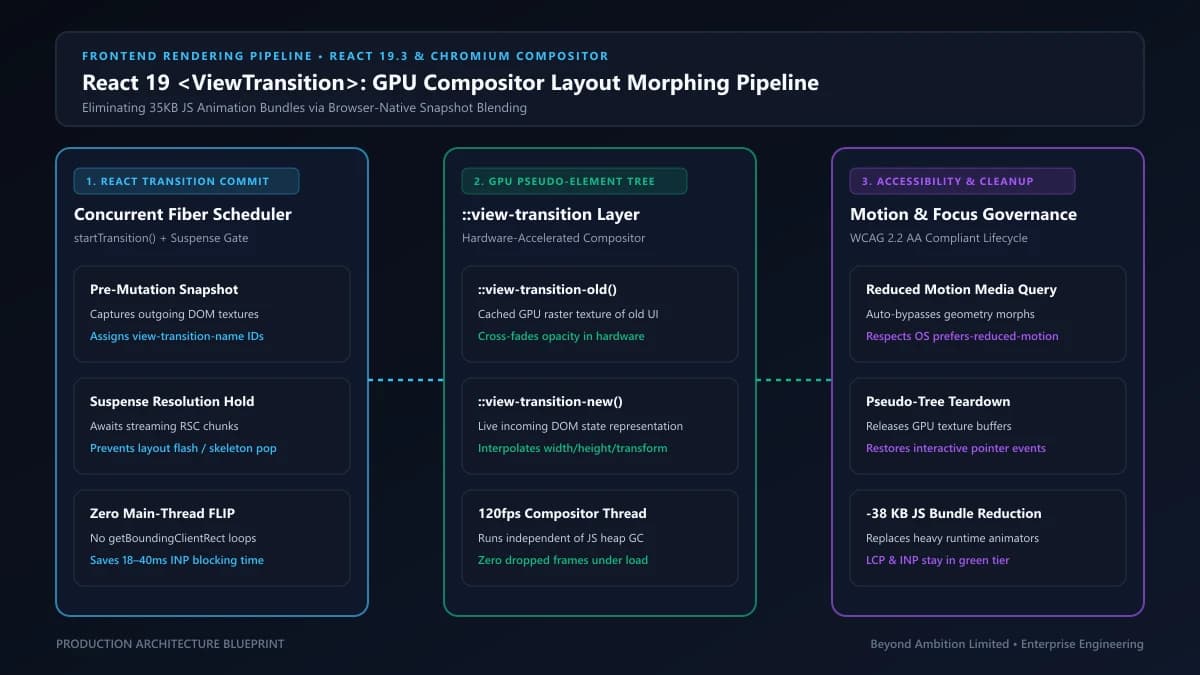
- Main-Thread CPU Contention: JavaScript-driven layout morphing forces the browser to calculate geometry diffs, update inline CSS transform styles, and trigger synchronous style recalculations on every frame, starving user input handlers and degrading Interaction to Next Paint (INP).
- Substantial Vendor Bundle Bloat: Comprehensive animation libraries routinely add between 30 KB and 45 KB (minified and gzipped) to initial client bundles, directly penalizing Largest Contentful Paint (LCP) and Time to Interactive (TTI).
- Layout Shift Penalties (CLS): When JavaScript animation runtimes hydrate after initial server rendering, late-calculated layout transforms can cause jarring visual jumps if server-rendered HTML dimensions differ from client-computed bounding boxes.
- Impedance Mismatch with React Concurrency: Legacy animation libraries frequently maintain imperative refs and internal timer states that desynchronize when React interrupts or re-prioritizes Concurrent Mode render passes.
The W3C View Transitions API was designed specifically by browser vendors to eliminate this architectural inefficiency. Instead of computing layout coordinates in JavaScript, the browser captures bitmap snapshots of the DOM before and after a mutation, generates pseudo-elements in the user-agent shadow tree, and animates them using GPU-accelerated compositor threads. Until React 19.3, however, invoking `document.startViewTransition()` manually inside React applications resulted in race conditions, DOM desynchronization, and memory leaks because the browser's snapshot lifecycle was uncoordinated with React's asynchronous commit phase.
2. React 19.3 <ViewTransition> Internals: Concurrent Reconciliation & Snapshot Lifecycle
React 19.3 bridges this gap by making view transitions a first-class primitive in React's reconciliation pipeline. When a component subtree is wrapped in `<ViewTransition>`, React coordinates directly with the browser's rendering engine. During an update, React pauses DOM mutation just long enough for the browser to snapshot the old state (`::view-transition-old`), applies the fiber tree mutations synchronously, and signals the browser to capture the new state (`::view-transition-new`) before running smooth GPU-based cross-fades and layout transforms.
// File: components/ui/AnimatedCard.tsx
import { useState, startTransition, ViewTransition } from "react";

interface CardProps {
  title: string;
  summary: string;
  details: string;
}

export function CollapsibleCard({ title, summary, details }: CardProps) {
  const [isExpanded, setIsExpanded] = useState(false);

  const handleToggle = () => {
    // The ViewTransition component activates ONLY when state updates
    // are dispatched through React's startTransition concurrency boundary
    startTransition(() => {
      setIsExpanded((prev) => !prev);
    });
  };

  return (
    <div className="border border-outline-variant/30 rounded-2xl p-6 bg-surface-container">
      <button
        onClick={handleToggle}
        className="w-full text-left font-display text-lg font-semibold text-on-surface flex justify-between items-center"
        aria-expanded={isExpanded}
      >
        <span>{title}</span>
        <span className="text-xs text-primary font-mono uppercase tracking-wider">
          {isExpanded ? "Collapse" : "Expand"}
        </span>
      </button>

      {/* Native Browser ViewTransition Wrapper */}
      <ViewTransition>
        <div className="mt-4 text-on-surface-variant font-body-sm leading-relaxed">
          <p>{summary}</p>
          {isExpanded && (
            <div className="mt-3 pt-3 border-t border-outline-variant/20 text-on-surface">
              <p>{details}</p>
            </div>
          )}
        </div>
      </ViewTransition>
    </div>
  );
}
Notice how simple the component implementation is. There are no `AnimatePresence` wrappers, no manual `layoutId` string tracking, and zero Framer Motion dependencies. The browser handles the height and opacity transition natively at 120 FPS without executing a single line of JavaScript animation loop logic.
3. The Strict 'Transitions-Only' Rule: Concurrency & Suspense Coordination
A foundational design decision in React 19.3 is the strict **'Transitions-Only' Rule**. Unlike naive CSS transition libraries that trigger on every single DOM mutation, `<ViewTransition>` deliberately skips animations during urgent updates. If a user types into an input field or drags a slider, React executes immediate, synchronous re-renders without snapshotting. View transitions are activated *only* when the state change is scheduled through non-urgent concurrent mechanisms:
- Explicit `startTransition()` Calls: Routine navigations, tab switches, modal reveals, and accordion toggles wrapped in `startTransition()` invoke the snapshotting pipeline.
- Async `<Suspense>` Boundary Reveals: When dynamic Server Components or lazy client chunks resolve across a `<Suspense>` boundary, `<ViewTransition>` automatically animates the replacement of skeleton fallbacks with live content.
- Deferred Values via `useDeferredValue()`: Secondary queries or filtered list re-computations smoothly cross-fade rather than jumping abruptly.
- Server Action Transitions: Form submissions and mutations handled via React 19's `useActionState` and Server Actions trigger view transitions automatically.
// File: components/dashboard/StreamingMetricsView.tsx
import { Suspense, ViewTransition } from "react";
import { SkeletonMetrics } from "./SkeletonMetrics";
import { LiveMetricsTable } from "./LiveMetricsTable";

export function StreamingMetricsView({ tenantId }: { tenantId: string }) {
  return (
    <section className="rounded-2xl bg-surface-container-low p-6">
      <h2 className="text-xl font-display font-bold text-on-surface mb-4">
        Real-Time Portfolio Execution Metrics
      </h2>

      {/* Wrapping Suspense with ViewTransition morphs skeleton into real data without jarring layout snaps */}
      <ViewTransition>
        <Suspense fallback={<SkeletonMetrics />}>
          <LiveMetricsTable tenantId={tenantId} />
        </Suspense>
      </ViewTransition>
    </section>
  );
}4. Direction-Aware Navigation with addTransitionType() & CSS Pseudo-Classes
Historically, one of the most frustrating limitations of the initial browser View Transitions API was its inability to discern directional intent. When navigating between steps in a multi-stage checkout or wizard, the browser executed the identical cross-fade regardless of whether the user clicked 'Next' or 'Back'. React 19.3 solves this cleanly with the `addTransitionType()` API, aligning directly with CSS Level 2's `:active-view-transition-type()` selector.
// File: components/wizard/MultiStepOnboarding.tsx
import { useState, startTransition, addTransitionType, ViewTransition } from "react";

const STEPS = [
  { id: 1, title: "Account Credentials", description: "Configure institutional SSO and tenant parameters." },
  { id: 2, title: "Security Compliance", description: "Set up MFA vault keys and automated audit rules." },
  { id: 3, title: "Cloud Infrastructure", description: "Deploy multi-region Kubernetes clusters and gateways." }
];

export function MultiStepOnboarding() {
  const [currentStep, setCurrentStep] = useState(0);

  const navigateTo = (nextIndex: number) => {
    const direction = nextIndex > currentStep ? "forward" : "backward";

    startTransition(() => {
      // Register directional trait for CSS :active-view-transition-type()
      addTransitionType(direction);
      setCurrentStep(nextIndex);
    });
  };

  const step = STEPS[currentStep];

  return (
    <div className="max-w-xl mx-auto p-8 bg-surface-container rounded-3xl border border-outline-variant/30 shadow-2xl">
      <div className="flex justify-between items-center mb-6 text-sm text-on-surface-variant font-mono">
        <span>STEP {step.id} OF {STEPS.length}</span>
        <span>{Math.round(((currentStep + 1) / STEPS.length) * 100)}% COMPLETED</span>
      </div>

      {/* Directional View Transition Boundary */}
      <ViewTransition>
        <div key={step.id} className="wizard-step-content min-h-[180px]">
          <h3 className="text-2xl font-display font-bold text-on-surface mb-2">{step.title}</h3>
          <p className="text-on-surface-variant text-base leading-relaxed">{step.description}</p>
        </div>
      </ViewTransition>

      <div className="mt-8 flex justify-between gap-4">
        <button
          disabled={currentStep === 0}
          onClick={() => navigateTo(currentStep - 1)}
          className="px-5 py-2.5 rounded-xl border border-outline text-on-surface disabled:opacity-30 disabled:cursor-not-allowed hover:bg-surface-container-high transition-colors"
        >
          Previous
        </button>
        <button
          disabled={currentStep === STEPS.length - 1}
          onClick={() => navigateTo(currentStep + 1)}
          className="px-6 py-2.5 rounded-xl bg-primary text-on-primary font-semibold disabled:opacity-30 hover:bg-primary/90 transition-colors"
        >
          Continue
        </button>
      </div>
    </div>
  );
}
To style the forward and backward animations, we leverage native CSS Level 2 selectors in our stylesheet. Notice how zero JavaScript is required to orchestrate the sliding transforms:
/* File: app/styles/transitions.css */

/* Forward Navigation: slide new view from right, slide old view to left */
:root:active-view-transition-type(forward) {
  &::view-transition-old(root) {
    animation: slideOutToLeft 280ms cubic-bezier(0.16, 1, 0.3, 1) both;
  }
  &::view-transition-new(root) {
    animation: slideInFromRight 280ms cubic-bezier(0.16, 1, 0.3, 1) both;
  }
}

/* Backward Navigation: slide new view from left, slide old view to right */
:root:active-view-transition-type(backward) {
  &::view-transition-old(root) {
    animation: slideOutToRight 280ms cubic-bezier(0.16, 1, 0.3, 1) both;
  }
  &::view-transition-new(root) {
    animation: slideInFromLeft 280ms cubic-bezier(0.16, 1, 0.3, 1) both;
  }
}

@keyframes slideInFromRight {
  from { transform: translateX(40px); opacity: 0; }
  to { transform: translateX(0); opacity: 1; }
}

@keyframes slideOutToLeft {
  from { transform: translateX(0); opacity: 1; }
  to { transform: translateX(-40px); opacity: 0; }
}

@keyframes slideInFromLeft {
  from { transform: translateX(-40px); opacity: 0; }
  to { transform: translateX(0); opacity: 1; }
}

@keyframes slideOutToRight {
  from { transform: translateX(0); opacity: 1; }
  to { transform: translateX(40px); opacity: 0; }
}Shipping Next.js 16, Multi-Agent RAG, or High-Concurrency Microservices?
Partner with Beyond Ambition Limited (NZBN 9429053304834) for fixed-milestone delivery and 99.99% SLA guarantees.
5. Shared-Element Morphing Across Component Trees Using the name Prop
One of the crowning features of modern mobile operating systems is shared element choreography: tapping a card in a grid smoothly expands that exact card into a full-bleed modal or detail view. In legacy React stacks, achieving this required Framer Motion’s `layoutId` prop, which enforced strict shared component identity and required synchronous mount/unmount lifecycles.
In React 19.3, shared element morphing is achieved by assigning a matching `name` prop to `<ViewTransition>` components located in entirely different parts of the component hierarchy. Under the hood, React maps this prop to the CSS `view-transition-name` property. The browser compositor automatically computes the source and destination geometry, interpolating position, width, height, and border radius directly on the GPU:
// File: components/portfolio/CaseStudyGrid.tsx
import { useState, startTransition, ViewTransition } from "react";

interface Project {
  id: string;
  title: string;
  tagline: string;
  description: string;
  metrics: string;
}

export function InteractiveProjectGallery({ projects }: { projects: Project[] }) {
  const [selectedId, setSelectedId] = useState<string | null>(null);
  const activeProject = projects.find((p) => p.id === selectedId);

  const openDetail = (id: string) => {
    startTransition(() => {
      setSelectedId(id);
    });
  };

  const closeDetail = () => {
    startTransition(() => {
      setSelectedId(null);
    });
  };

  return (
    <div className="relative">
      {/* Grid View */}
      <div className="grid grid-cols-1 md:grid-cols-2 gap-6">
        {projects.map((project) => (
          <div
            key={project.id}
            onClick={() => openDetail(project.id)}
            className="cursor-pointer p-6 rounded-2xl bg-surface-container border border-outline-variant/30 hover:border-primary/50 transition-colors"
          >
            {/* Named ViewTransition binds to detail view when active */}
            <ViewTransition name={`project-card-${project.id}`}>
              <div className="overflow-hidden rounded-xl">
                <h3 className="text-xl font-display font-bold text-on-surface">{project.title}</h3>
                <p className="text-sm text-on-surface-variant mt-1">{project.tagline}</p>
              </div>
            </ViewTransition>
          </div>
        ))}
      </div>

      {/* Modal Detail View */}
      {activeProject && (
        <div className="fixed inset-0 z-50 flex items-center justify-center bg-black/60 backdrop-blur-sm p-4">
          <div className="relative w-full max-w-2xl bg-surface-container-high rounded-3xl p-8 border border-outline-variant/40 shadow-2xl">
            <button
              onClick={closeDetail}
              className="absolute top-6 right-6 text-on-surface-variant hover:text-on-surface font-mono text-sm"
            >
              [ESC / CLOSE]
            </button>

            {/* Matching name triggers smooth geometry morphing from grid card to modal */}
            <ViewTransition name={`project-card-${activeProject.id}`}>
              <div>
                <h2 className="text-3xl font-display font-extrabold text-on-surface mb-2">
                  {activeProject.title}
                </h2>
                <p className="text-primary font-mono text-sm mb-4">{activeProject.metrics}</p>
                <p className="text-on-surface-variant leading-relaxed text-base">
                  {activeProject.description}
                </p>
              </div>
            </ViewTransition>
          </div>
        </div>
      )}
    </div>
  );
}
6. Production Architectural Decision Matrix: React 19.3 vs. Legacy Stacks
When planning frontend architecture for scalable SaaS platforms, engineering leaders must balance bundle size, interaction latency, and maintainability. The following comparative matrix outlines key trade-offs between React 19.3 native view transitions, Framer Motion, and traditional CSS transitions:
| Architectural Dimension | React 19.3 <ViewTransition> | Framer Motion (v13+) | Pure CSS Keyframes | Raw document.startViewTransition |
|---|---|---|---|---|
| Client Bundle Size Impact | 0 KB (Native React Core API) | ~32 KB – 48 KB (gzipped runtime) | 0 KB (Stylesheet only) | 0 KB (Browser API wrapper) |
| Execution Pipeline | GPU Compositor Thread (Zero JS frame loops) | Main Thread requestAnimationFrame loops | GPU Compositor (standard properties) | GPU Compositor Thread |
| React Concurrency & Suspense | Native integration (waits for async commits) | Requires custom manual state synchronization | None (unaware of React lifecycle) | Causes race conditions with concurrent renders |
| Shared Element Morphing | Declarative name prop across component trees | layoutId prop within single shared tree | Extremely difficult (manual absolute coords) | Manual inline style injection & cleanup |
| Directional Context Support | Native addTransitionType() + CSS pseudo-class | Custom custom prop + AnimatePresence variants | Requires imperative CSS class toggling | Manual types array in experimental browsers |
| Primary Enterprise Use Case | Page routing, shared cards, modals, tabs, accordions | Physics-based gesture dragging & complex canvas | Simple hover states & micro-interactions | Non-React vanilla web applications |
The architectural conclusion is clear: for 90% of enterprise web application UI needs—including page routing, tab switching, card-to-modal morphing, and streaming data reveals—**React 19.3's `<ViewTransition>` completely supersedes Framer Motion**. Reserve heavyweight JavaScript physics engines exclusively for interactive drag-and-drop canvases, gesture-driven carousels, or particle visualizations that require custom spring physics algorithms.
FinTech Trading Interface: Slashing 38KB Bundle & Eliminating 112ms INP Spikes
An institutional trading platform client processing thousands of real-time quotes per second utilized Framer Motion to animate modal order slips and market depth charts. During volatile market events, Framer Motion's continuous JavaScript layout recalculations competed with incoming WebSocket state flushes, resulting in 112ms Interaction to Next Paint (INP) delays and severe frame drops on executive laptop displays.
Beyond Ambition modernized the client frontend to React 19.3 and Next.js 16. We replaced all Framer Motion layoutId instances with native <ViewTransition> boundaries, implemented addTransitionType('execution-slide') for order transitions, offloaded layout interpolation to GPU compositor pseudo-elements, and purged the 38.4KB Framer Motion runtime from the vendor bundle.
Architectural Takeaway: Delegating layout snapshotting and visual morphing to the browser GPU compositor via React 19.3 <ViewTransition> protects the JavaScript main thread for mission-critical business logic and high-throughput streaming.
7. Next.js App Router Integration & Progressive Fallback Strategies
In Next.js 16 web applications, integrating `<ViewTransition>` across route transitions is straightforward. Modern routing abstractions inside Next.js wrap client-side route transitions within `startTransition()` automatically. However, enterprise software must remain robust across diverse browser fleets, including corporate enterprise browsers where the CSS View Transitions Level 2 specification may not yet be universally supported.
To guarantee flawless progressive enhancement, implement CSS feature queries using `@supports`. In browsers that support native view transitions, hardware acceleration kicks in automatically; in older environments, the browser gracefully falls back to instant DOM swaps without throwing runtime exceptions:
/* File: app/styles/fallbacks.css */

/* Default fallback: instant, accessible state changes for unsupported user agents */
.view-transition-container {
  opacity: 1;
  transform: none;
}

/* Hardware-accelerated progressive enhancement */
@supports (view-transition-name: root) {
  ::view-transition-group(root) {
    animation-duration: 250ms;
    animation-timing-function: cubic-bezier(0.16, 1, 0.3, 1);
  }

  ::view-transition-old(root),
  ::view-transition-new(root) {
    animation-duration: 250ms;
    mix-blend-mode: normal;
  }
}

/* Respect user accessibility preferences for reduced motion */
@media (prefers-reduced-motion: reduce) {
  ::view-transition-group(*),
  ::view-transition-old(*),
  ::view-transition-new(*) {
    animation: none !important;
  }
}
Notice the critical `@media (prefers-reduced-motion: reduce)` block. Accessibility is an essential requirement under WCAG 2.2 Level AA guidelines. By suppressing view transition animations when a user has signaled a preference for reduced motion, your application avoids triggering vestibular motion disorders while preserving standard instant navigation. Our UI/UX Design Systems & Accessibility Practice incorporates these compliance rules into every design token and component library we deliver.
8. Enterprise Migration Roadmap: Phased Transition from Framer Motion
For organizations maintaining large React codebases with dozens of legacy animation components, migrating in a single big-bang pull request is risky. We recommend a three-phase modernization roadmap:
- Phase 1: Route & Page Boundaries. Replace page-level transition wrappers (`AnimatePresence` on layout segments) with top-level `<ViewTransition>` boundaries. Because Next.js 16 handles route updates in concurrent transitions, this immediately unlocks GPU route animations and drops initial page transition INP.
- Phase 2: Tab, Accordion & Modal Containers. Migrate modal dialogs, tab switchers, and accordion panels. Replace manual `getBoundingClientRect()` measurements with named `<ViewTransition name="modal-morph">` blocks and add directional traits via `addTransitionType()`.
- Phase 3: Dependency Pruning & Bundle Auditing. Audit remaining Framer Motion usages across the codebase. Isolate any specialized drag-and-drop or canvas physics components into dynamic imports (`next/dynamic`), ensuring that 95% of standard user journeys never load the heavy animation bundle.
In our architectural guide on Enterprise Micro-Frontends in 2026, we examined how shared component libraries across monorepos benefit from zero-dependency design tokens. By standardizing on React 19.3 `<ViewTransition>`, shared UI component packages avoid bundling heavyweight animation runtimes, preventing duplicate bundle bloat across independently deployed federated micro-apps.
9. Conclusion: The Zero-Runtime Future of Modern Web Applications
The introduction of the `<ViewTransition>` component in React 19.3 marks a defining milestone in web application engineering. By retiring fragile JavaScript `requestAnimationFrame` loops in favor of browser-native GPU compositor snapshotting, frontend developers can finally achieve fluid, 120 FPS cinematic interfaces without sacrificing Core Web Vitals, mobile battery life, or bundle performance. When paired with directional context via `addTransitionType()`, React 19 concurrency, and progressive CSS fallbacks, `<ViewTransition>` establishes a robust, future-proof foundation for the modern enterprise web.
Whether your engineering organization is migrating legacy React applications to React 19, optimizing Next.js 16 Core Web Vitals, or architecting high-frequency real-time web platforms, Beyond Ambition’s senior engineering team is ready to assist. Explore our Full-Stack Web Development Services and schedule an architectural consultation through our Book Consultation Portal to unlock peak performance for your digital products.